
Glassdoor | Jobs & Careers
Indeed, Inc.Business
4.727.93K Reviews
- Version
- 13.16.0
- Installs
- 10.00M
- Age Rating
- Everyone
Screenshots
Our Review of Glassdoor | Jobs & Careers
 Analysis by Appyee
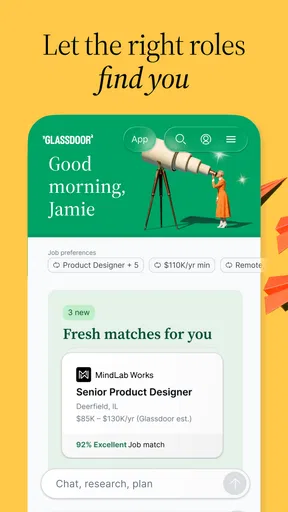
When I look for work from a phone, I want more than a list of vacancies. I want enough context to decide whether a role deserves my time before I start an application. Glassdoor is built around that wider job-search decision: it brings employment opportunities and workplace information into the same mobile experience, so I can move from discovering a position to researching the company without constantly switching between unrelated tools.
That approach makes the app especially interesting as a business tool rather than just a vacancy browser. Indeed, Inc. develops it, and the app is free for everyone to use. It has been available since March 13, 2013, and its current Android release is version 13.10.0, requiring Android 8.0 or later. The large user base is reflected in a 4.7 average from around 711 thousand ratings, with more than 10 million installs.
A sensible starting point for a job search
I would start with a practical question rather than an open-ended scroll: what kind of role am I looking for, and what would make an employer worth considering? That small bit of preparation helps Glassdoor work as a career research app, not just another feed to browse whenever I have a spare minute.
For example, someone considering a move into a new field can use a job search to identify employers hiring for relevant roles, then investigate those companies before deciding which opportunities merit a closer look. A person who already knows the exact employer and position may have less need for this middle step and could go straight to the company’s careers page instead.
How Glassdoor feels when the connection is doing the work
I find the connected experience most useful when I use it for one clear task at a time: identify a role, then look into the employer while that opportunity is still in mind. That makes it easier to notice which questions need answering before I move on. With that basic rhythm in place, the next step is deciding how much the surrounding company information should influence my shortlist.
Searching is useful, but the surrounding information matters more
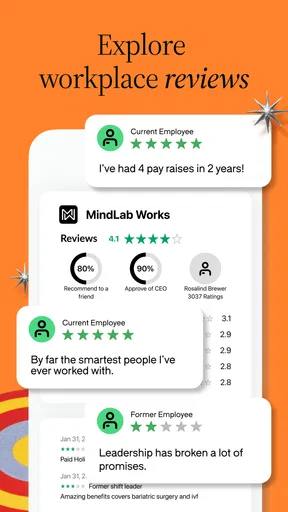
In my experience, the strongest part of Glassdoor is not simply finding a job title. It is the chance to investigate the employer while the opportunity is still fresh in my mind. A vacancy can look attractive because of its wording, location, or responsibilities, but workplace feedback and company context may change how seriously I take it. That extra layer helps turn a quick search into a more informed comparison.
The app is therefore most valuable when I am not applying impulsively. I can browse a role, consider the company behind it, and decide whether the position fits my priorities. Someone focused only on collecting as many listings as possible may prefer a dedicated jobs board with a more stripped-down workflow. Glassdoor makes more sense for people who want research to be part of the search itself.
The connection plays a central role in that process. Job listings, company information, and user-facing content need to load as I move through the app. On a reliable network, the experience feels naturally connected: I discover an opening, inspect the employer, and continue evaluating it from the same device. On a weak connection, that chain becomes less comfortable because every additional piece of research depends on another successful request.
A realistic phone-based job search
Imagine I am commuting and notice that a former colleague has mentioned an opening at a company I have been considering. I can use Glassdoor during a short break to search for the role, check the employer’s wider reputation, and decide whether it is worth revisiting at home. That is a more realistic use than trying to complete an entire career change in a few spare minutes.
The mobile format works well for those small decisions. I do not need to be sitting at a desk to decide which companies deserve closer attention. I can use the app to narrow my options while moving through the day, then reserve the more careful reading and application work for a calmer moment. This division of labor is important: the phone is excellent for discovery and screening, but not automatically the best place for every stage of a serious application.
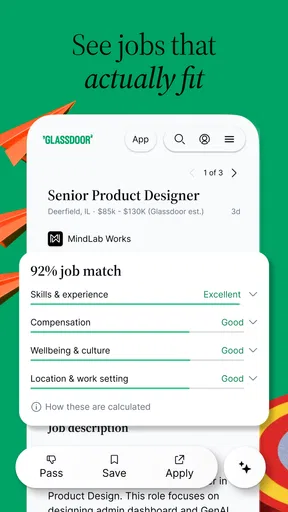
I also find the research angle helpful when several vacancies appear similar. Job titles can hide major differences in culture, expectations, and day-to-day experience. Reading the surrounding company material before committing gives me a better reason to prioritize one listing over another. It does not replace my own judgment, but it reduces the chance of treating every polished job description as equally appealing.
Making a shortlist instead of applying on impulse
A useful next step is to turn an interesting search into a small, deliberate shortlist. I would note the role, employer, and one reason each is worth investigating, then revisit those choices when I have time to read carefully. This is especially helpful if I search in scattered sessions: a short note gives me a starting point next time instead of making me reconstruct my thinking from scratch.
For someone changing careers, the shortlist can also reveal a useful distinction between a role that sounds appealing and one that fits their current experience. If several employers describe similar work in different ways, I can compare the responsibilities and use that comparison to identify skills I may need to explain in an application. Glassdoor can support that thinking, but I would still tailor my résumé and examples separately.
It is also worth deciding what would make me rule out an employer before I begin. Perhaps I need a particular location, a work environment that suits my responsibilities outside work, or a role with room to grow. Having those criteria in mind prevents company research from turning into an endless search for a perfect answer that no app can provide.
Where the app fits beside ordinary alternatives
A conventional jobs board is often better when my only goal is speed: enter a role, scan openings, and move through a large number of results. A company’s own careers page is usually the better destination when I already know the employer and want the most direct application route. Glassdoor occupies the space between those choices. It is designed for the moment when I am still deciding what a company and role are really worth.
That distinction also explains its main trade-off. The additional context can make the search more thoughtful, but it can also make it less immediate. I may spend longer researching a company instead of quickly sending applications. For a user who measures success by the number of applications submitted in an hour, that may feel like unnecessary friction. For me, it is worthwhile when the decision involves a major career move.
Small habits that make the mobile workflow better
One useful habit is to separate discovery from commitment. I first use the app to identify promising roles, then compare the employers rather than applying to the first acceptable listing. This prevents the search from becoming a stream of isolated decisions. The app’s value increases when I treat it as a shortlist-building tool, not merely a button for immediate applications.
A second habit is to read company information with a question in mind. Instead of browsing aimlessly, I ask whether the employer seems suitable for my preferred work environment, career stage, or expectations. That makes the research more practical and helps me notice when a role is attractive on paper but less convincing in context.
A third is to keep a simple personal record of roles I have already considered. Mobile searching encourages repeated visits to similar listings, especially when I am checking during short breaks. Writing down the employer, role, and reason for interest outside the app helps me avoid revisiting the same options and makes later comparisons clearer.
Passing from research to an application
Once I have chosen an opportunity, I treat the app as a bridge to the next stage rather than assuming that browsing and applying are the same task. I review the role’s requirements, make sure I understand why it suits me, and then use the employer’s own application route when that is the most direct option. This handoff keeps my research useful without asking a mobile search session to do every part of the job hunt.
Before leaving the research stage, I would make a short list of questions raised by the company information or job description. Those questions can help me assess the opportunity more carefully and, if I reach an interview, prepare relevant points to ask. The practical benefit is not that the app supplies a definitive answer; it helps me arrive at the next conversation with a clearer idea of what I need to find out.
This is also where a desktop can be the better tool. If I am comparing several roles against a résumé, editing application materials, or preparing a detailed response, a larger screen and my usual document workflow are more comfortable. I would use Glassdoor to guide the decision, then switch tools for focused writing and final checks.
What happens when the network is unreliable
The app is much more comfortable when I have a stable connection. Searching, opening a listing, and moving into company research are all activities where delays interrupt concentration. A page that takes too long to appear can break the train of thought that made me interested in the role in the first place. This matters more on mobile than it would on a desktop connection, because phone users often search in short, interrupted sessions.
If a request fails, my preferred recovery method is simple: stop trying to complete the whole task at once. I note the employer or role I was investigating, wait until the connection improves, and return to the search rather than repeatedly refreshing. That approach avoids wasting time and reduces the risk of making a decision based on only half-loaded information.
I would not choose this app as my only preparation tool for an important interview or application deadline. A connection problem at the wrong moment could leave me without the context I expected to review. For time-sensitive work, I prefer to do the final research earlier, while the network is dependable, and keep the application details organized separately.
Using it thoughtfully on a limited data plan
People watching their mobile data should treat job research as a planned activity rather than something to leave running continuously. Repeatedly opening the same employer pages, jumping between listings, and refreshing during a poor signal can use more data and battery than a short, focused session. I get better results by deciding what I need to learn before opening the app.
For example, I might begin with a small group of roles, inspect only the companies that genuinely match my goals, and stop once I have enough information to make a shortlist. This is more efficient than scrolling indefinitely. It also improves the quality of the search because I am comparing meaningful options rather than reacting to every new listing.
Network awareness is particularly useful when traveling or moving between Wi-Fi and mobile data. I prefer to do deeper company research when I know the connection is steady, then use shorter mobile sessions for checking new opportunities. I view this as a practical limitation of connected career software, not a flaw unique to Glassdoor: the richer the information, the more important the connection becomes.
Who will get the most from it
I would recommend Glassdoor to someone changing industries, relocating, or trying to understand employers before applying. It is also a good fit for cautious applicants who would rather submit fewer, better-considered applications. The combination of job discovery and company research supports a more deliberate process than a vacancy list alone.
It can also help people who are early in their careers and are still learning how to evaluate employers. A job title may be unfamiliar, while the company context gives the search a more concrete shape. Used carefully, the app can encourage better questions about the workplace instead of focusing only on whether the role sounds impressive.
On the other hand, I would skip it as my primary tool if I already have a precise target and want the fastest route to that employer’s application form. I would also look elsewhere if my workflow depends on uninterrupted access during a long journey or if I strongly prefer to manage every application from a desktop. The app is not a substitute for tailoring a résumé, preparing examples, or verifying important details directly with the employer.
How I handle uncertainty in company information
Company feedback is useful as a signal, not as a final verdict. Individual experiences can differ by team, manager, location, and time. I therefore look for patterns and use the information to form questions rather than assuming that every comment describes the exact role I am considering. This is one of the most important judgment calls when using a workplace-research app.
I also compare what I learn with the actual job description and the employer’s own material. If the role promises one kind of environment but the broader context raises different questions, I treat that as a reason to investigate further. Glassdoor helps me notice those gaps, but it cannot make the decision for me.
My final view of the connected experience
Glassdoor works best when I have a dependable connection and enough time to think. Its advantage is the relationship between a job opportunity and the employer behind it. Rather than pushing me toward the quickest possible application, it encourages a more informed choice, which is valuable when the consequences of a job change are significant.
The trade-off is that the experience depends on active browsing and can feel less convenient when the network is slow, data is limited, or I need a purely application-focused workflow. I would not rely on it as a complete offline career kit or as the only place I prepare important applications. I see it as a connected research companion for the stage where I am deciding which opportunities deserve serious attention.
Overall, I think it earns its place on an Android phone for anyone who wants to investigate companies while searching for work. The free price and Everyone age rating make it easy to try, while the 4.7 average suggests that many users find the approach useful. My recommendation is straightforward: use it to build a thoughtful shortlist, verify important details through the employer’s own channels, and do the deeper work when your connection is reliable. Its real strength is helping me choose where to apply, not merely showing me what is available.
Privacy and Permissions
See what permissions an app requests and how it handles your data.
- Location
- approximate location (network-based)
- Phone
- read phone status and identity
- Microphone
- record audio
- Wi-Fi connection information
- view Wi-Fi connections
- Device ID & call information
- read phone status and identity
- Other
- view network connections, full network access, run at startup, control vibration, prevent device from sleeping, Google Play license check
Verdict
Strengths of Glassdoor | Jobs & Careers
- Detailed company reviews from current and former employees.
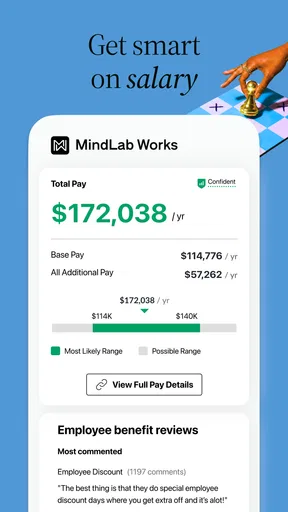
- Salary insights help users compare compensation before applying.
- Job alerts make it easier to track relevant new openings.
- Interview reports provide useful preparation for candidates.
- Company ratings cover workplace culture, management, and benefits.
Limitations of Glassdoor | Jobs & Careers
- Some reviews may be outdated or reflect highly personal experiences.
- Salary data can be limited for smaller companies or niche roles.
- Many job listings redirect users to external application pages.
- Advanced search and career tools may require account registration.
- Sponsored listings can make organic job results less noticeable.
Similar Picks in This Category
View All
LinkedIn: Community & Network
LinkedIn3.8

Zoom Workplace
zoom.com4.1

Microsoft Teams
Microsoft Corporation4.6

Meta Business Suite
Meta Platforms, Inc.4.6

Webex Meetings
Cisco Systems, Inc.4.5

TeamViewer Remote Control
TeamViewer4.4
Frequently Asked Questions
What is Glassdoor, and what can I use it for?
Glassdoor is a careers and job-search platform that combines job listings with company information, employee reviews, salary reports, interview experiences, and workplace ratings. After exploring the app, I found it useful for comparing employers before applying, researching typical pay for a role, reading opinions from current and former employees, and following companies for new vacancies. It is designed for both active job seekers and people casually planning their next career move.
Can I apply for jobs directly through the Glassdoor app?
Yes, Glassdoor allows users to search for open positions and apply to many of them directly through the app or through the employer’s application page. You can filter results by location, job title, salary, remote-work options, experience level, and other criteria. However, the application process varies by listing: some employers accept applications within Glassdoor, while others redirect you to their own careers website, so you may need to create additional accounts.
Are Glassdoor company reviews, salaries, and ratings reliable?
Glassdoor content is submitted by employees, former employees, and job candidates, so it can provide valuable first-hand perspectives but should not be treated as absolute fact. Reviews may reflect individual experiences, personal expectations, or a particular team rather than the entire organization. Salary information is also based on user reports and estimates. I recommend comparing several reviews, checking dates, considering the job location, and confirming compensation details during the interview process.
Does Glassdoor require an account, and is the app free to download?
Glassdoor is free to download and offers access to job searches, company profiles, workplace reviews, salary information, and career resources. Some features or content may require you to create an account or contribute information, such as a review, salary report, or interview experience. Registration can also unlock personalized job recommendations, saved searches, application tracking, and job alerts. Always review the current privacy settings before sharing professional or personal details.
Is Glassdoor useful for finding remote, part-time, or international jobs?
Glassdoor can be helpful for finding remote, hybrid, part-time, contract, and full-time opportunities, depending on the country and the employers posting vacancies in your selected region. Search filters make it easier to narrow results by work arrangement, location, and employment type. Still, job availability and listing quality vary considerably by market. Before applying, carefully verify whether a position is genuinely remote, where you must be located, and whether any travel or legal restrictions apply.
